



How to start accounting for a small partnership (MB) in Lithuania (0)

How to get started with accounting for a small partnership (MB) in Lithuania
Starting your own business is exciting. You have ideas to bring to life, customers to find and plans to put into action. But sooner or later, every business owner faces another important task: keeping the company’s finances in order.
If you’ve recently established a mažoji bendrija (MB), or small partnership, in Lithuania, you might be wondering where to begin with accounting. How do you issue your first invoice? How should you record business expenses? And how can you keep track of your company’s financial performance?
The good news is that getting started doesn’t have to be complicated. With the right accounting software and a few basic settings, you can manage many everyday financial tasks in one place.
Let’s go through the essentials.
1. Start with your company details
Before issuing invoices or recording expenses, make sure your company’s basic information is correct.
In SimplBooks, you can start by adding your MB’s registration details, contact information and bank account. You can also upload your company logo, which will appear on your invoices.
One important detail is your VAT status. If your MB is not registered for VAT, make sure to select the appropriate setting. This helps ensure that your invoices are prepared correctly.
Tip: Taking a few minutes to complete your company profile now can save you time when creating invoices later.
2. Set up your accounting from the beginning
Every company needs a starting point for its accounting records.
If you’ve just established your MB, your opening balances may be zero. Even so, it’s important to save the opening balance transaction with the correct date.
If your company has already been operating and you’re switching accounting software, you’ll need to enter the balances from your previous records. In this case, it’s worth checking the figures with your accountant.
You can also customize a few basic settings in SimplBooks, such as your preferred date format, homepage and accounting start date.
Once these are in place, you’re ready to handle everyday transactions.
3. Create and send your first sales invoice
You’ve completed your first project or sold your first product. Now it’s time to get paid!
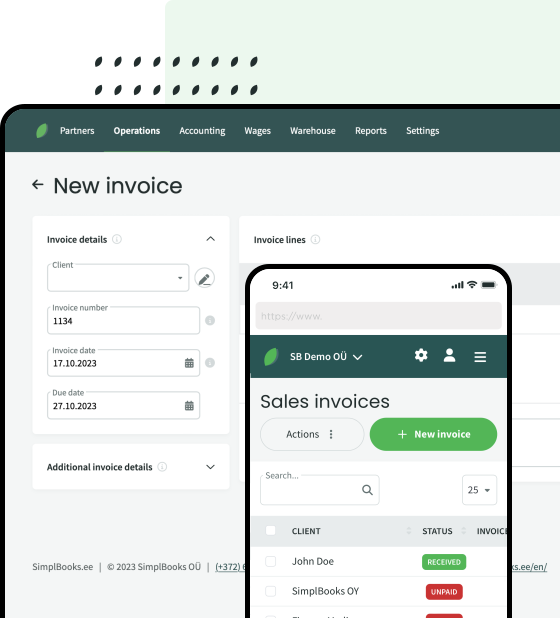
Creating a sales invoice in SimplBooks is straightforward:
- Select your customer.
- Add the product or service you’ve provided.
- Enter the quantity, price and payment due date.
- Save the invoice and send it to your customer.
You can send invoices directly from SimplBooks or download them as PDFs.
If you regularly provide the same services, you can save them in advance. This means you won’t have to type the same descriptions and details every time you prepare an invoice.
You can also customize your invoice template with your company’s logo and preferred layout.
The result? Less repetitive work and more time to focus on your customers.
4. Keep track of business expenses
Running a business involves more than receiving payments. There are also expenses to manage, such as software subscriptions, rent, phone bills, equipment and other purchases.
Recording these expenses regularly helps you understand where your money goes and keeps your accounting records organized.
In SimplBooks, you can add purchase invoices by entering the supplier, invoice number, date, amount and appropriate expense account.
If your MB sells physical products, you can also manage products, purchases and stock quantities using inventory features.
A useful habit: Don’t leave all your purchase invoices until the end of the month. Recording them as they arrive makes it much easier to keep track of your finances.
5. Make bank transactions easier to manage
Checking incoming payments and matching them with invoices can quickly become time-consuming, especially as your business grows.
SimplBooks helps make this process more manageable.
You can manually mark invoices as paid or import an XML bank statement into the software. SimplBooks suggests matches between bank transactions and recorded invoices, which you can review and confirm.
This helps you keep track of which customers have paid, which invoices are still outstanding and what payments your business has made.
Instead of searching through bank statements and invoices separately, you can manage the information in one accounting environment.
6. Understand how your business is performing
Accounting isn’t just about meeting obligations. It’s also about understanding your business.
Are your expenses increasing? How much revenue have you earned? Is your company making a profit?
In SimplBooks, you can view financial reports such as the profit and loss statement and balance sheet.
These reports help you see the bigger picture and make more informed business decisions.
Of course, reliable reports depend on accurate accounting records. That’s why keeping your invoices, expenses and payments up to date is so important.
7. Get help whenever you need it
You don’t need to know everything about accounting on your first day.
SimplBooks offers a Help Center with step-by-step instructions, and customer support is available if you need assistance.
You can also activate the SimplBooks AI Assistant, which can help you find answers about using the software, review accounting information and prepare invoice details.
It’s an extra helping hand when you’re learning your way around the program.
Ready to get started?
Managing accounting for your small partnership doesn’t have to feel overwhelming. Start with the basics: enter your company details, create your first invoice, record expenses and keep an eye on your financial results.
As your business grows, having your financial information organized in one place can make everyday work much easier.
Want to see exactly how it works?
We’ve prepared a step-by-step guideline how to set up SimplBooks for a Lithuanian small partnership (MB), from the first settings to financial reports.
👉Read the guidline: How to get started with SimplBooks for a small partnership (MB)
Or try SimplBooks free for 30 days and discover how much simpler everyday accounting can be.
Read also other useful blog posts:
– 10 reasons for a small business to choose SimplBooks accounting software
– 12 reasons for an accountant to choose SimplBooks software


Leave a Reply